
All posts by Dimitris

Goat Herder, Adromeda Constellation, NZ1X1

PoW-Hook: Zero-Trust Security for your Git Hooks

In the world of Git, client-side hooks are a delicate line of defense. We rely on them for linting, security scans, and unit tests, yet they are notoriously easy to bypass with a simple --no-verify flag. For security-conscious teams, this isn’t just a loophole; it’s a liability.

Enter PoW-Hook, an autonomous “Proof of Work” validation system for Git. PoW-Hook brings cryptographic enforcement to your development workflow, ensuring that no commit reaches your remote repository unless it has legitimately passed your local checks.

The Architecture of Trust

PoW-Hook operates on a Zero-Trust model. It treats the developer’s machine as an untrusted environment until a cryptographic signature proves compliance. The system is divided into three distinct layers:

  • The Laborer (Local Hooks): When a developer prepares a commit, PoW-Hook runs the mandatory local checks (configured via POW_CHECKS_CMD). On success, it generates a session UUID and records an attestation.
  • The Notary (Signing): The commit-msg hook signs a tri-factor payload – consisting of the Git tree hash, the session ID, and the passing status – using the developer’s local SSH private key. This signature is then bundled into a single, clean PoW-Checks Git trailer.
  • The Gatekeeper (Remote Verification): Upon pushing, a GitHub Action (or pre-receive hook) extracts the signature. It fetches the developer’s registered public keys directly from the GitHub API and verifies the signature. It also cross-references the session ID against a remote ledger to prevent “man-in-the-middle” signature forgery.

    Automated Incident Response

    One of the most powerful features of PoW-Hook is its aggressive incident response. If a commit is pushed without a valid signature:

    • Instant Obliteration: The validator force-reverts the branch to the last known-good state.
    • PR Quarantine: Any associated Pull Requests are automatically closed, and administrators are notified.
    • Support-Level Cleanup: Since GitHub’s API doesn’t allow for hard-deleting PR metadata, PoW-Hook provides direct links for admins to file a support ticket for complete history scrubbing.

    Why PoW-Hook?

    • Key Agnostic: Supports all SSH key types registered on GitHub (Ed25519, RSA, ECDSA).
    • Zero-Bypass: Even malicious insiders cannot bypass the server-side gatekeeper without the required cryptographic proof.
    • Low Overhead: Uses standard GitHub API calls and Action runner minutes, making it a cost-effective alternative to enterprise-only solutions.

    Get Started

    Getting started with PoW-Hook is a two-step process:

    1. Repo Admin: Run admin_install.py to scaffold the verification workflows.
    2. Developer: Run install.sh to configure local signing.

    For more details on the implementation, visit the PoW-Hook Architecture in the repository.
The AMD Vulkan Chronicles

This is a classic “Developer in the Trenches” story. It’s got a ghost in the machine, a GPU that won’t cooperate, and a happy ending with a dark-horse model.

Below is a summary of our troubleshooting session and a blog post draft you can share with the LLM community.


Executive Summary

  • The Goal: Run an LLM with Tool-Calling capabilities on a Windows machine with an AMD Radeon RX 5500 XT (8GB VRAM) using Ollama and the Vulkan backend.
  • The Conflict: * Gemma 3 1B suffered from “Split-Brain” syndrome, offloading 576MB to the CPU despite having 7.3GB of free VRAM.
    • Llama 3.2 1B ignored user-defined context limits and tried to allocate a massive 128k context window (8.3GB), causing an ErrorOutOfDeviceMemory crash.
    • Environmental Ghost: A hidden system-level variable (OLLAMA_CONTEXT_LENGTH: 131072) was overriding session settings.
  • The Solution: Switched to Qwen 2.5 Coder 1.5B. It proved to be the most stable for AMD/Vulkan, respected memory limits, and handles tool-calling/Greek characters natively.

Blog Post: The AMD Vulkan Chronicles

Title: Fighting the 128k Ghost: My Journey to Stable Local LLMs on AMD

If you’ve ever tried to run local LLMs on Windows with an AMD card, you know the “Vulkan Dance.” Last night, I went ten rounds with Ollama trying to get a simple 1B model to run fully on my Radeon RX 5500 XT. Here is the post-mortem of that battle.

1. The Ghost in the Registry

I started by trying to run Gemma 3 1B. My GPU has 8GB of VRAM, and the model is tiny. It should have been a breeze. Instead, I saw the dreaded “Split-Brain”: Ollama was shoving 500MB+ onto my CPU.

The Culprit: My logs revealed a hidden system variable: OLLAMA_CONTEXT_LENGTH: 131072. No matter what I typed in PowerShell, the system was forcing a 128k context window, which ate my VRAM for breakfast.

Lesson: Always check your ollama serve logs for the env="map[...]" section. If there’s a variable there you didn’t set, find it in your Windows Environment Variables and kill it.

2. The Llama 3.2 “Memory Leak”

Next, I tried Llama 3.2 1B. This resulted in a total panic: ggml_vulkan: Device memory allocation failed. Even though I set my context to 32k, the Llama runner ignored me and tried to reserve 8.3GB of VRAM for a 128k window. On an 8GB card, that’s an instant crash.

3. The “Split-Brain” Mystery

Even after freeing up 7.3GB of VRAM, some models (like Gemma 3 QAT) still insisted on putting a fraction of the weights on the CPU. This is often due to VRAM fragmentation. Windows and AMD drivers are conservative; if they can’t find one perfectly continuous block of memory, they bail to the CPU, tanking your tokens-per-second.

4. The Winner: Qwen 2.5 Coder 1.5B

After failing with the “big names,” I pivoted to Qwen 2.5 Coder 1.5B.

  • Stability: It loaded 100% onto the GPU instantly.
  • Speed: I went from a 3.7-second “handshake” lag to near-instant responses.
  • Utility: Since I’m building a tool to manage my Greek supermarket lists (including baby supplies for my 3-person family), the “Coder” variant’s strictness with JSON and tool-calling was exactly what I needed.

My Final Setup Script:

If you’re on an AMD card, don’t just run ollama run. Use a clean PowerShell session:

PowerShell

$env:OLLAMA_NUM_CTX="16384"  # Start safe
$env:OLLAMA_VULKAN="1"
ollama serve

Final Takeaway: Don’t get married to a specific model. If the drivers hate the architecture, pivot to Qwen. It’s the hidden gem of the small-model world for AMD users.


Complexity Scale Integration System (COSINE)

This blog post introduces COSINE, a framework designed to move AI automation from “guessing” to “engineering.” It treats complexity as a measurable metric rather than a feeling.


Beyond the Prompt: Introducing COSINE (COmplexity Scale INtegration systEm)

We have reached a plateau in AI automation. The initial “magic” of asking an LLM to do everything is wearing off, replaced by a harsh reality: AI is expensive, slow, and sometimes hallucination-prone for tasks that a simple script could solve in milliseconds.

The industry is currently suffering from “Agentic Overkill.” We are building massive, probabilistic chains for problems that have a deterministic core. To solve this, we need a governor—a system that measures the “angle” of a task before a single token is spent.

Enter COSINE: the COmplexity Scale INtegration systEm.

What is COSINE?

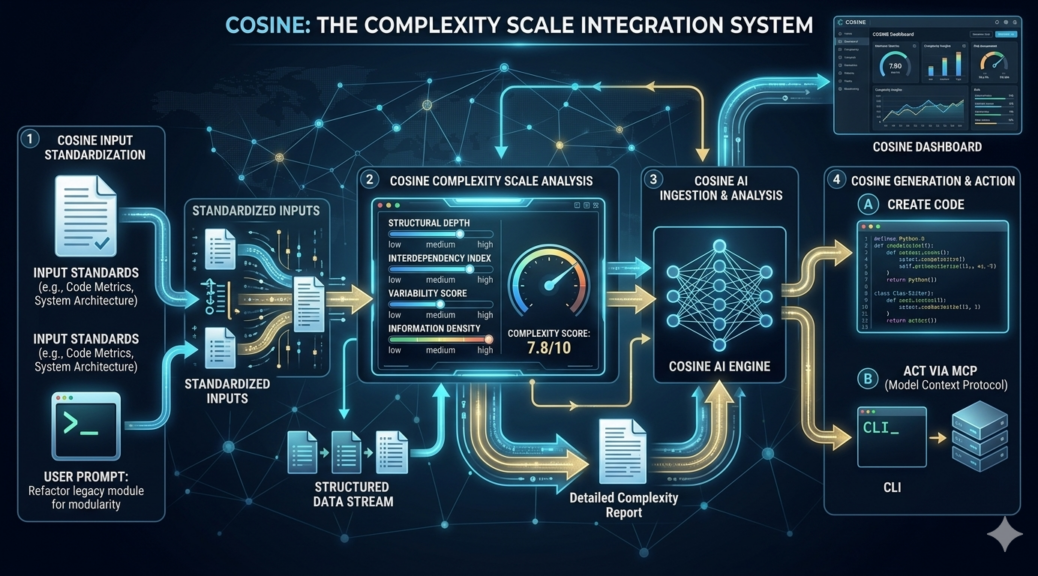
COSINE is an architectural layer that sits between a user’s intent and the execution engine. It doesn’t just “run” a prompt; it analyzes the task against a set of Engineering Standards to decide the most efficient path to completion.

The COSINE workflow follows a strict logic:

  1. Input: User Prompt + Standardized Complexity Constraints.
  2. Analysis: The system calculates a Complexity Index ($C$).
  3. Bifurcation: * Low $C$: COSINE instructs the AI to generate and execute local code.
    • High $C$: COSINE engages the AI as an agent to act via MCP (Model Context Protocol).

The Metrics: Measuring Complexity

Instead of “vibes,” COSINE uses established software engineering principles to grade a task:

  • Data Entropy ($H$): How unstructured is the input? High entropy (unstructured text/images) pushes the score toward AI; low entropy (JSON/SQL) pulls it toward code.
  • Cyclomatic Complexity ($M$): If the logic requires a high number of decision paths (linearly independent paths through the code), it may be too brittle for a script and better suited for an LLM’s reasoning.
  • Space-Time Requirements: If the task requires processing 10,000 records in <1 second, the Complexity Index forces a Code-only output.

A simplified version of the COSINE decision formula might look like this:

$$C = \omega_1(H) + \omega_2(M) – \omega_3(\text{Determinism})$$

Where $\omega$ represents the weight of each factor based on your specific system requirements.


The Two Paths of COSINE

1. The Synthetic Code Path (Low Complexity)

If COSINE determines the task is deterministic and has low entropy, it doesn’t “perform” the task using an LLM. Instead, it uses the AI as a compiler. The AI generates a self-contained Python or JavaScript script, executes it in a sandboxed environment, and returns the result.

  • Benefit: 100% accuracy, zero recurring token cost for the logic, and instant execution.

2. The Agentic MCP Path (High Complexity)

When the complexity exceeds the threshold—meaning the task requires environmental awareness, iterative reasoning, or access to live external data—COSINE activates the Model Context Protocol (MCP).

  • The Action: The AI acts as an operator, using MCP to “plug in” to your databases, Slack, or local file systems to perform multi-step reasoning that code alone cannot capture.

Why COSINE Matters

By implementing COSINE, we move away from “Prompt Engineering” and toward System Engineering. We stop wasting the “brainpower” of Large Language Models on trivial logic. We save the expensive, probabilistic reasoning of the LLM for the truly “messy” problems, while letting the cold, hard efficiency of code handle the rest.

In the world of 2026 automation, we don’t need smarter models; we need a smarter scale. We need COSINE.